|
|
Hi All,
We have been on the maximum BT FTTP packaged now called 'Superfast Fibre 4' since getting FTTP in mid 2017.
Recently, I have noticed significant peak time slow downs and high average and maximum latency from the BQM
BQM 5th August 2018
BQM 16th September 2018
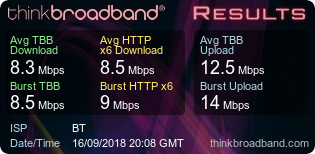
Is this likely a contention issue to be reported? Anyone experienced speeds this bad on FTTP?
Looking at the BQM, it started becoming this extreme from the 28th August.
For reference, I am on a gigabit wired connection to our UniFi USG-3P with DPI and IPS disabled.
|
|
|
|
Yup. Congestion on the BT Wholesale network, or the connection between their network and Openreach.
|
|
|
Well I am on Ultrafast 2 Plus with is BT's current fastest home Package via FTTP and ours is no way near as bad as that and never has been.
Looking at the BQM's I would of put you as having FTTC, if I was you I would phone BT to look into it, even on FTTP there is a lower limit which I was told was 34 to 45Mbits (assuming you was on the 300Mbit package) before BT would class it as a fault.
Not too sure where you are from or how far you are from London but if you are on the 300 - 330Mbits package and from London you should be getting around what I am getting on my speed tests and BQM.
Maybe you have a damaged fibre cable ?
Maybe your exchange is needs upgrading or a few of your neighbours (on the same splitter node as you) are hammering their connection.
But I would see what other people say first, before you phone BT.
Paul
|
|
Register (or login) on our website and you will not see this ad.
|
|
|
There is a link to speed test results that show us the graphic as well. That is quite important for picking up on congestion.
Like this. (It does mean we have to follow the link but �.)
My broadband basic info/help site - www.robertos.me.uk. Domains, site and mail hosting - Tsohost.
Connection - AAISP Home::1 80/20. 200GB. Sync 68038/12542Kbps @ 600m. BQMs - IPv4 & IPv6 |
|
|
There is a link to speed test results that show us the graphic as well. That is quite important for picking up on congestion.
Like this. (It does mean we have to follow the link but �.)
Did you try and click on the OP Speed test Result Image ?
Paul
|
|
|
Bah!


My broadband basic info/help site - www.robertos.me.uk. Domains, site and mail hosting - Tsohost.
Connection - AAISP Home::1 80/20. 200GB. Sync 68038/12542Kbps @ 600m. BQMs - IPv4 & IPv6 |
|
|
|
|
|
|
The BQM suggests congestion, but the single and multiple downloads look like something is limiting.
It is possible the congestion is so bad that some emergency speed limits are being imposed, need to see a speed test during a good BQM period, starting to get bad and when really bad.
The handover is in Stone, so its a case of finding others nearby to compare, but with that sort of drop you need to report to the ISP, and point out the times at which speeds get really bad.
|
|
The author of the above post is a thinkbroadband staff member. It may not constitute an official statement on behalf of thinkbroadband.
|
|
|
|
Those are shocking speeds for a 330 Meg FTTP line, mine has never dropped below 300 Mbps at any time of the day on the BTW network. Can you post Speedtest results, say from first thing in the morning for comparison?
If its exchange congestion, might be worth asking BT to put you on a different virtual path (svlan).
|
|
|
Maybe you have a damaged fibre cable ?
Paul
A damaged fibre that's fine apart from at peak times, Paul?
It's not going to be the fibre access network. It's an issue with BT Wholesale.
|
|
|
Thanks all.
Just done another test connected directly to the modem using PPPoE to rule out any internal issues.
Very much the same tonight.

I will try a run a few more tests over the next 24 hours and get in touch with BT tomorrow.
|
|
|
I bet the BT Wholesale speed test gives you full speed  . They'll route it direct to the test server!
My broadband basic info/help site - www.robertos.me.uk. Domains, site and mail hosting - Tsohost.
Connection - AAISP Home::1 80/20. 200GB. Sync 68038/12542Kbps @ 600m. BQMs - IPv4 & IPv6 |
|
|
Surprisingly not, it is just the same.
Download: 12.47Mbs
Upload: 19.86Mbs
Latency: 33ms
Other neighbours have noticed it has been slow recently so I have asked a few to set up a quality monitor. I will report back.
We were the first in our exchange area to get FTTP. There are significant number of other premises which look due to be passed very soon (if not already) so I wonder if the link is not up to it.
Andrew may be able to work his magic on the local area if many more have come online in the past few weeks.
Edited by tlewis (Mon 17-Sep-18 23:08:26)
|
|
|
Maybe you have a damaged fibre cable ?
Paul
A damaged fibre that's fine apart from at peak times, Paul?
It's not going to be the fibre access network. It's an issue with BT Wholesale.
I was assuming the OP was getting this issue all the time, in their last post they said their neighbours is also suffering too along more speed tests having issues.
But yeah could be a wholesale issue, but if there was an issue with one of the four fibres going into the Splitter Node that might also cause an issue, just saying.
But I will wait and see.
Paul
|
|
|
I bet the BT Wholesale speed test gives you full speed . They'll route it direct to the test server!
It is really irritating when they do that and the fact the BT Wholesale test only saves the last test result if it saves at all. Surprisingly (or not) every time I've had congestion issues and logged them on the BTW testing they always claimed they couldnt access those results until I produced all the test screen grabs, corresponding BQMs and throughput plots using SNMP monitoring.
|
|
|
|
We're getting slightly improved speeds during the day at
70Mb Down
30Mb Up
Ran on speedtest.net as I am not home currently.
BT were unsurprisingly unhelpful, insisting that I plug in a BT Home Hub so they can run tests and blaming my internal network. The advisor didn't believe that you are able to connect directly to the ONT using PPPoe.
Issue is I don't have the original BT hub any more so I am having to wait for them to send one out so they can run tests.
So hopefully the hub will arrive tomorrow and i'll call them again to get them to raise it as a fault.
|
|
|
I bet the BT Wholesale speed test gives you full speed . They'll route it direct to the test server!
Unless the test server is connected directly to the same MSE the poster's connection is terminating on in the exchange this is unlikely.
|
|
|
I was assuming the OP was getting this issue all the time, in their last post they said their neighbours is also suffering too along more speed tests having issues.
But yeah could be a wholesale issue, but if there was an issue with one of the four fibres going into the Splitter Node that might also cause an issue, just saying.
But I will wait and see.
Paul
Pretty much everyone uses BT Wholesale for FTTP. Saturation on the CableLink between BTW and the Openreach OLT, on the SVLAN carrying FTTP traffic or on the bearer carrying the VLANs will cause problems for everyone. A damaged fibre would show as packet loss 24x7 alongside likely intermittent connection.
If it's been going on for some time it's likely the former or latter of those as the SVLAN should have been automatically resized if there were capacity for it to be.
|
|
|
The BT hubs have their own speed test built in, and this may report back to them so there is a lot of sense in them confirming it with their hardware.
MORAL: Keep ISP supplied hardware for these rare diagnostic moments.
|
|
The author of the above post is a thinkbroadband staff member. It may not constitute an official statement on behalf of thinkbroadband.
|
|
|
|
Are you not getting the full (~ 310 Mbps) speed at any time at all?
If you're not getting much joy from BT support over the phone then post your issue on the BT forums.
|


 Pages in this thread:
  Print Thread


