|
|
Hello,
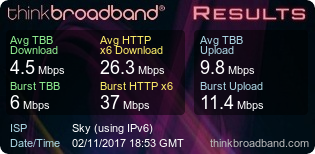
I've switched to the Sky Fibre Max product and was guaranteed a minimum of 44 mbps. The router is receiving around 55 mbps according to the stats page though i'm only pulling around 26 mbps on a wired sppedtest through the test socket. All wireless connectivity is switched off. Graph below:
Openreach have been out 3 times, changed faceplate, reset the line and switched the ports in the cab and switched the line from the cab to the junction box in the street.
Any ideas? Am i best to revert to the standard fibre product as i'm not seeing much if any improvement.
|
|
|
The stats page is meant to reflect the connection speed of the service, so connection looks good and would explain why Openreach cannot find anything wrong
https://www.thinkbroadband.com/speedtest/15096487992... the graphs are more informative than the figures alone, looks like you probably get a lot closer to the max on a 55 Mbps connection which is 52 Mbps but for a very short time and then things slow down....
When doing a single download the speeds are very slow, i.e. to get the best speed needs multiple downloads and that is indicative of a network problem usually rather than a VDSL2 issue. Were speeds nice and stable and good previously?
For example when on the previous service was the test results more like http://tbb.st/1509643589772531855 i.e. rapid rise to maximum speed on both tests and the speeds were sustained for the 8 seconds
|
|
The author of the above post is a thinkbroadband staff member. It may not constitute an official statement on behalf of thinkbroadband.
|
|
|
|
what browser are you using?
can you try ip4 rather than ip6?
any 'antivirus' stuff?
all known to sometimes impact on speed tests
|
|
Register (or login) on our website and you will not see this ad.
|
|
|
|
Hello and thanks for the reply. I actually meant to link the graphs but didn't so thanks for doing that! Yes, on the previous service the graphs were more stable and I have noticed the initial stage of the speed test I am getting close to what I would expect but then it tails off into the high teens.
|
|
|
Using Chrome in a Mac and also tried a Windows laptop. Both comparable. Just ran an ip4 and again results pretty much the same.

Edited by deleted (Thu 02-Nov-17 20:31:39)
|
|
|
|
It could be congestion, it could also be a faulty router.
My old Q hub seemed to get stuck at 26Mbps on wireless, new ones fine.
What does speedtest.net show?
|
|
|
If the connection is behaving as graphs indicate it is entirely possible to get a happy result from some other testers
In actual use does the connection feel slower or faster than the previous one and how is streaming video performing, in theory if line is performing as per connection figures YouTube 4K video should have no issues
|
|
The author of the above post is a thinkbroadband staff member. It may not constitute an official statement on behalf of thinkbroadband.
|
|
|
also worth them trying to download one of your big download test files, and see how long that takes.
https://www.thinkbroadband.com/download
|
|
|
Another option is to run it directly at http://labs.thinkbroadband.com/speedtest
The difference being that this is over HTTP rather than HTTPS - should be no difference but its worth a double check when things are behaving oddly
|
|
The author of the above post is a thinkbroadband staff member. It may not constitute an official statement on behalf of thinkbroadband.
|
|
|
Thanks for the suggestions. I should have said Sky also sent a new router which didn't make any difference. Speed feels the same as previous. I'm not seeing any real improvement in DL speed. When running the 50mb test file it's taking about 2 mins which sucks! The HTTP test results are below

Speed test.net shows around 15 - 17 Mbps DL and 17 UL
|
|
|
Sort of beside the point but can you upload line stats? Just so we can see some basics such as the noise margin sync etc. I've seen a friends line with a 3db target SNR, with SNR falling to 1db and throughput playing up.
Edited by ukhardy07 (Thu 02-Nov-17 23:25:34)
|
|
|
|
Router Statistics
System Up Time: 24:11:31
Port Status TxPkts RxPkts Collision Pkts Tx b/s Rx b/s Up Time
WAN MER 1665290 2261028 0 0 0 12:45:44
LAN Up 481 181 0 0 0 24:11:31
WLAN (2.4 GHz) Up 851385 630059 0 1 1 24:10:09
WLAN (5 GHz) Up 2025337 1337705 0 2 1 24:10:07
Broadband Link Downstream Upstream
Connection Speed 56110 kbps 18726 kbps
Line Attenuation 19.2 dB 0.0 dB
Noise Margin 6.6 dB 6.6 dB
|
|
|
|
you say you are connected with a wire
however the stats above indicate the vast majority of the traffic is via wireless
|
|
|
Said i did the speedtest through ethernet, though yes the majority of devices connected to the router are via wireless. Thanks for pointing that out..
Edited by deleted (Fri 03-Nov-17 13:14:08)
|


 Pages in this thread:
  Print Thread


