|
|
Hi,
I've just switched from BT Infinity to Zen and I've noticed a strange problem with my speed. The modem is syncing at a reasonable speed (around 64 to 66) and some speed tests show about that speed. However, individual downloads (app updates, for example) seemed slow.
Having done some testing with downloading some largish files from various places (Linux kernels, etc), it seems that I'm getting significantly less speed than the DSL line is capable of.
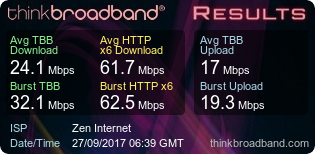
The speed test on here does seem to show the discrepancy, but I'm not exactly sure how to interpret the results:
 https://www.thinkbroadband.com/_assets/speedtest/but...
From looking at other people's results, it seems like mostly the TBB number and the HTTP number are the same, but as you see, mine are wildly different.
I've asked Zen about it and sent them some results. They asked me to run a speedtest on their site which also shows the discrepancy between a "custom download" and an "HTTPx6" download. (14.50 Mpbs vs 60.42 Mbps).
So any idea what the two tests are measuring and why there is such a large discrepancy?
Thanks,
Mark
Edited by melevittfl (Wed 27-Sep-17 09:55:00)
|
|
|
I'm having the same issues as you for a few weeks now, along with packet loss mostly every evening of around 5% to 10% average.
My current BQM graph: https://www.thinkbroadband.com/broadband/monitoring/...
My speed test this morning: https://www.thinkbroadband.com/_assets/speedtest/but...
Last I heard I'm told they're waiting for an update from the network investigation team, at least for my case, but it does worry me if things will go silent. I'll keep contacting them every week though for an update and if this can't be resolved in a few weeks from now at most then I'll ask them to respectfully release me from the broadband contract due to this issue.
|
|
|
On the test we have on the main site
tbb test is a single HTTP download
HTTPx6 is six HTTP downloads at the same time
If the Zen test was the flash based tester, then similar single versus multiple downloads, but the single is using a custom TCP socket protocol.
The idea of running a single test is that it will show up congestion or other network or PC config issues more clearly than multiple downloads
The shape of the graph suggests that a single download almost reaches the speed but then falls away, if the issue is congestion you'd expect to see some variation in the graph shape over multiple tests, if its the same all the time then likely a network based issue.
|
|
The author of the above post is a thinkbroadband staff member. It may not constitute an official statement on behalf of thinkbroadband.
|
|
Register (or login) on our website and you will not see this ad.
|
|
|
|
Thanks for the explanation. Not sure about the shape of the graph, but I am getting fairly consistent results regardless of the time of day I run the test (I work from home so I've been running it periodically.)
My BT Infinity connection used the BT Openreach modem and an Asus router. Yesterday I plugged in the Fritzbox router supplied by Zen and tested with a laptop connected via Ethernet to one of the Fritzbox switch ports to eliminate any issue with the existing equipment and got exactly the same test results. (All the other tests are also wired but through another switch in an office upstairs).
So, when you say "network issue", am I right in assuming you mean a network issue somewhere within Zen's network?
Thanks again,
Mark
|
|
|
Possibly Zen network but it may be in a wholesale network, others have had the issue and Zen seem to be able to fix it eventually.
Another way to see if its congestion or a network configuration issue, is that congestion should vary across the time of day and 6am to 8am are probably best times to test to see if speeds improve (or it a night owl anytime after 1am)
|
|
The author of the above post is a thinkbroadband staff member. It may not constitute an official statement on behalf of thinkbroadband.
|
|
|
|
Sorry, I meant "Zen's network" as opposed to my network. In other words, this is a problem that Zen are responsible for fixing, rather than a problem with my kit or phone line.
Thanks,
Mark
|
|
|
It looks that way, and based on experience from others with same issue in the past am fairly confident in that
|
|
The author of the above post is a thinkbroadband staff member. It may not constitute an official statement on behalf of thinkbroadband.
|
|
|
|
Joined Zen beginning of September. Really terrible speeds. Complained . Did some tests for them to eliminate any fault with my setup and involved BTW. In a few days got a new connection which is very good. 70 to 75Mbps down and 18 - 18.5Mbps up at all times with very smooth graph. EXCEPT single thread at a steady 20Mbps at all times. Asked support about this and was told that this was not a problem as hardly anyone used single thread downloads these days and that BTW wouldn't consider this a problem. But is it for a non techie?
|
|
|
Live video streaming is single thread for sure as are some non live streams
|
|
The author of the above post is a thinkbroadband staff member. It may not constitute an official statement on behalf of thinkbroadband.
|
|
|
hardly anyone used single thread downloads these days and that BTW wouldn't consider this a problem.
If that were true, I'd expect to not notice iOS app updates going so slowly, etc. I mean, that might be true if your streaming Netflix, but that isn't the only thing people use the Internet for. I'd guess downloading a Netflix show to watch offline isn't multi-threaded either. Any software updates you download, etc. are going to be done "single-threaded".
Somewhat disturbing that Zen is fobbing you off.
|
|
|
Damn, I see. Well single threaded speed is pretty important still. Streaming is just one example of a single threaded transfer. Even downloading files on Chrome is slow because it's single threaded. Steam on the other hand, for example, does multi threaded transfers so it's fast. I don't understand what's causing some customers of Zen to experience this slow single threaded download speed issue, nor do I understand why Zen told you it's not important as it is important. I'm on their LLU by the way, I used to be on WBMC.
Edited by Ixel (Wed 27-Sep-17 21:04:50)
|
|
|
|
Ditto packet loss ,latency up from 12ms up to 144ms i'm only on adsl2+ and was thinking of going fttc , but if things don't improve I think i'll be looking else where
|
|
|
Shocking latency in Guildford. Been like this since the last 'maintenance'. It is not my line, modem etc... I'm on ADSL2 Zen LLU.
I'm at work 8am until 6pm so absolutely no usage on the line. Light usage in the evening.
TBB Ping Chart
|
|
|
I've been using SpeedofMe for a while now, only uses single threading.
SpeedOf.Me is a single threaded test while most others (like the one that you have used) are multi-threaded. SpeedOf.Me uses a single connection to download the sample files which is closer to what users actually do in their everyday browsing and downloading.
HG612 -> pfSense 2.4B
--------------------------------------------------------
Artificial Intelligence is no match for Natural Stupidity.
--------------------------------------------------------
|
|
|
Hi, Anyone experiencing single thread speed issues please feel free to PM me your details and I'll make sure the issue is investigated properly.
Best regards,
Andrew Sayle
-------------------------------------------------------
Andrew
ZeN Internet
|
|
The above post has been made by an ISP REPRESENTATIVE (although not necessarily the ISP being discussed in the post).
|
|
|
|
I thank you for this offer Andrew and I have sent a PM. I did wonder about the importance of single thread download as the downloads I have done seem very slow to what I thought they should be. My usage of the Internet is pretty low by todays standards, around 2gig a day. But I would like to think that I have the best possible speed I can get from Zen. I must also say though, even though the advice from one service rep does seem wrong, I cannot fault the friendliness and the general manner of all the reps I have dealt with at Zen.
|


 Pages in this thread:
  Print Thread


 ajays
ajays