|
|
Hi folks.
Been with Uno Broadband (partial LLU via TalkTalk equipment) since 2012 and on the whole things have been fine.
Pretty predictable 11Mbps download sync (around 0.8 Mbps upwards), 6db downward noise margin and 38 db attenuation. So around 9/9.5 Mbps true download. Currently still looks this way.
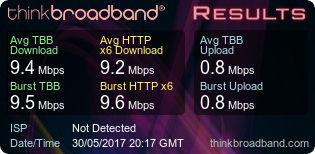
But recently, pages on the internet have started to take ages to load, like they're fighting their way through treacle. And sometimes they even time out and it can't seem to resolve their internet address at all. This applies to both a PC connected via Ethernet cable and a wireless connected laptop.
Checked Windows event viewer and there appeared to be the odd code 1014 DNS Client Events. So after speaking to tech support at Uno, I set the DNS servers to point to the Google ones. No joy. Still slow building pages on the internet, seems for some reason to be worse on the wireless connected laptop for some reason (don't know why!).
I've tried powering down the router and leaving it for 10 mins or so, but it doesn't seem to make any difference. The router is a BiPAC 8800NL R2 that was bought to replace an aging TPlink one that seemed to have overheating issues. The Billion has been fine up to now, very stable.
There have though been a couple of times that I've run the BT speed test (mainly because it's a quick one to run) when things have been VERY slow and it "appears" to have shown a poor download speed (around 2 Mbps) and the upload has almost appeared to be none existent (< 0.04 Mbps!). But a couple of minutes later, if run again, speed test appears OK. Though Internet pages still loading slowly. Router stats at this point still appear fine though (IE. stable line and not too many real errors logged).
Bit stumped really.
Anyone got any ideas???
Likely to be the router? or problems at the exchange etc.?
Thanks in advance.
PS. Sorry it's a little rambling post, just trying to give as much info as possible.
PPS. Always have Router Stats lite running, so I can see that the connection appears fine and no line drops etc.
----
Mike
|
|
|
Best to link to the full image or results page as the graphs convey more information
https://www.thinkbroadband.com/speedtest/14961754436...
In your case a very good ADSL2+ connection, and latency is a little high but not unduly for your location. There was one high latency check of 300 ms during the idle part of the test (analysis button in test lets you see the samples)
As for DNS have you looked at how quick DNS lookups are from the command line? e.g. is it failing on the first server sometimes? Best to flush the DNS cache (ipconfig /flushdns in windows command line) before trying this
|
|
The author of the above post is a thinkbroadband staff member. It may not constitute an official statement on behalf of thinkbroadband.
|
|
|
Have you checked your line quality meter in Uno Control Panel to see if there are any latency problems? Worth having a look to see if there is high latency.
|
|
Register (or login) on our website and you will not see this ad.
|
|
|
Best to link to the full image or results page as the graphs convey more information
https://www.thinkbroadband.com/speedtest/14961754436...
In your case a very good ADSL2+ connection, and latency is a little high but not unduly for your location. There was one high latency check of 300 ms during the idle part of the test (analysis button in test lets you see the samples)
As for DNS have you looked at how quick DNS lookups are from the command line? e.g. is it failing on the first server sometimes? Best to flush the DNS cache (ipconfig /flushdns in windows command line) before trying this
Thanks for taking the time to reply. Appreciated.
Question "As for DNS have you looked at how quick DNS lookups are from the command line?"
How do I do this?
Every click now taking a very noticeable time to resolve! Just like the good old "56k day"...
----
Mike
|
|
|
Your line behaviour has changed (seems to have been in the last few days) - we're seeing periods of 400-500MB data being uploaded an hour, that would make web pages and various things struggle.
Do you have any backups running in the background maybe?
Matt
|
|
|
Have you checked your line quality meter in Uno Control Panel to see if there are any latency problems? Worth having a look to see if there is high latency.
Thanks for the suggestion.
Excuse my ignorance, but where is this? are you talking about the MY Xilo page? If so, can't seem to see anything like this.
----
Mike
|
|
|
The upload activity UNO have highlighted would cause the problems you are seeing.
On how quick, its hit ENTER and see how long things take, should be pretty instant usually
Andrew
|
|
The author of the above post is a thinkbroadband staff member. It may not constitute an official statement on behalf of thinkbroadband.
|
|
|
|
My Xilo > Packages > My Broadband > Summary > Latency
For some reason it shows "fail" for me using a Billion 7800N - it might be OK for you though...
|
|
|
Your line behaviour has changed (seems to have been in the last few days) - we're seeing periods of 400-500MB data being uploaded an hour, that would make web pages and various things struggle.
Do you have any backups running in the background maybe?
Matt
Hi Matt
Sounds odd to me!
"Do you have any backups running in the background maybe"
I'm assuming you are referring to CLOUD type backups? If so, then no.
My main uses are basically a bit of browsing in the evening and watching the odd thing in the evening on Amazon Instant video (though I've had this since last December).
I'm currently looking at the Broadband Daily Usage for the current month on MY XILO and I can't see this!
There's 1.09GB showing for upload today... But I suspect that will be because of the speed tests I've been running off and on (I'm assuming this is why). All other days seem to show very small amounts of uploaded data (EG. 171.1MB for the 29th and 0MB for the 27/28th), Not sure quite what's going on here...
HELP.....
----
Mike
|
|
|
My Xilo > Packages > My Broadband > Summary > Latency
For some reason it shows "fail" for me using a Billion 7800N - it might be OK for you though...
Thanks.
Latency not showing (IE. data field is empty).
Ping Test showing "failed"
----
Mike
|
|
|
The upload activity UNO have highlighted would cause the problems you are seeing.
On how quick, its hit ENTER and see how long things take, should be pretty instant usually
Andrew
Excuse my ignorance but:
Are you talking about running nslookup from the command line?
----
Mike
|
|
|
Latency not showing (IE. data field is empty).
Ping Test showing "failed"
Ah, I wonder if it's an issue at Xilo's end, I did mention it to Matt in a ticket a few weeks ago but I was using a Thomson router then - both the Thomson and Billion routers were/are set to respond to pings.
Does turning wireless off make any difference to your upload usage? Uploading all that data must have taken a long time on ADSL2+ if you are directly responsible for it!
Edited by 4M2 (Tue 30-May-17 23:20:37)
|
|
|
Latency not showing (IE. data field is empty).
Ping Test showing "failed"
Are I wonder if it's an issue at Xilo's end, I did mention it to Matt in a ticket a few weeks ago but I was using a Thomson router then - both the Thomson and Billion routers were/are set to respond to pings.
Does turning wireless off make any difference to your upload usage? Uploading all that data must have taken a long time on ADSL2+ if you are directly responsible for it!
But this is the thing... I'm not, as far as I can see from the MY XILO daily usage stats, uploading much (if any) data at all. See my reply to Matt a couple of posts back.
Confused I am!!!
Think I'm off downstairs now for a stiff whisky.
----
Mike
Edited by MrBeeline (Tue 30-May-17 23:22:32)
|
|
|
But this is the thing... I'm not, as far as I can see from the MY XILO daily usage stats, uploading much (if any) data at all.
Confused I am!!!
There are no anomalies showing on my xilo "Broadband Daily Usage" history - the only major uploads were on the 19th May, during a metered period in the daytime, when I uploaded a few videos to YouTube amounting to nearly 1GB. Today and for the last few days the usage looks about right with very little upload data recorded.
Hope you get it sorted.
|
|
|
1GB is a lot to upload in a day. I suspect something running in the background that is uploading, I know because I upload a backup daily roughly about that size doubt that much would be racked up just from speed tests.
|
|
|
|
|
|
The author of the above post is a thinkbroadband staff member. It may not constitute an official statement on behalf of thinkbroadband.
|
|
|
With 0.8 Mbps upload an upload of 1.09GB today would mean you had to be speed testing solidly for 3 hours.
So time to track down what is uploading across your connection, remember mobile phones sync photos etc to cloud backups
|
|
The author of the above post is a thinkbroadband staff member. It may not constitute an official statement on behalf of thinkbroadband.
|
|
|
Right guys.... I'll try and rack my addled brains here. But Matt said:
"Your line behaviour has changed (seems to have been in the last few days) - we're seeing periods of 400-500MB data being uploaded an hour, that would make web pages and various things struggle."
and other than on the 30th May, that's NOT the case.
- on the 29th May it was 171.1MB
- on the 27/28th May it was 0 MB
- on the 26th May it was 8.57MB
- on the 25th May it was 78.79MB
Think I need some sleep and look at the problem tomorrow.
Thanks for the contribution/s up to now. TBC
----
Mike
|
|
|
|
It's possible that Matt can see unmetered usage if xilo are monitoring your line? However perhaps you are also suffering poor internet performance during the daytime metered periods when there was low upload data usage which you have listed? (Except, of course, during the entire weekend of the 27th and 28th when your data usage was unmetered and recorded as zero on your account.)
|
|
|
|
Wired or WiFi connection to computer?
Other devices in house?
|
|
|
If you run Windows 10, maybe make sure peer-to-peer Windows Update is disabled (although I have no idea how much data this can upload in practice).
Oliver.
|
|
|
Get in touch via your portal or phone - we can go through the usage with you.
To give you a rough idea, usually your monthly upload* usage is in the area of 0.65GB. This month has been more than double at 1.76GB so far.
Whilst you may be running speedtests - we're seeing 3-4 hour long periods of higher latency due to increased uploads so I doubt you're running them consistently for that long.
Matt
Edited by uno (Wed 31-May-17 13:14:21)
|
|
|
JohnR
PC is wired.
Laptop is wireless ... but I've tried a wired connection straight to the router and get the same problems.
Other devices
- Android smart phone (MotoG) and tablet (HUDL2). Both set to auto backup photos. But I take very few and have not in fact taken a photo on either for a couple of weeks now.
- Kindle, Youview, Sky and Amazon instant video are all connected. But I would not think these are likely to upload anything.
At the moment... I'm wondering if it could be my sisters laptop (Lenovo ideapad, only a month or so old). Especially as this problem seems to have started when she came home on Monday and it's this laptop that appears to be effected the worst (IE. one minute running fine, then it times out trying to access for example BBC.co.uk). So I've got her to shut this down and dig out her ancient Vista Laptop. So far, she appears to be able to use her old laptop OK (IE. no time outs etc.). Looking suspicious to me! But as to what the hell it could be doing, is another story. TBC
Oliver342
Good point. Peer-peer Windows updating is certainly disabled on my PC. Installed Windows 10 myself on it when I built it 18 months ago and that was one of the many things that got turned off ASAP. But I doubt if it is disabled on my sisters shop built lap top. Wonder what impact this could in theory have!?!? I'll turn it off and see what happens. Also must check that some plonker that transferred her photos from her digital camera to her laptop (while she was away) has not enabled OneDrive to back them up (that would be some amount of data to upload). Doubt it, but worth checking.
Uno (aca. Matt)
I'll give you a phone some time tomorrow and talk through the apparent heavy uploading that looks to have gone on and try to work out when this started.
Thanks everyone for your help up to now. I'm sure we will get to the bottom of this.
----
Mike
Edited by MrBeeline (Wed 31-May-17 22:45:53)
|
|
|
Looks like it's sorted now.
It was my sisters new Lenovo laptop.
I checked windows/Network.../settings/Data usage/details (only appears to work for WiFi usage and not an Ethernet linked PC) and what's sitting at the top of the list... Onedrive with 2.77GB. Which I assume is all uploaded data.
So as it was a pre built machine, One drive appears to be switched on by default to sync documents and photos. Fine when she did not have any on the laptop. But while she was away for the weekend, some one kindly transferred all the photos from her digital camera, to her laptop. This then promptly tried to sync them to the cloud. Probably a good idea if you have fibre broadband but not on an ADSL2+ link with only 0.8 Mbps upward!!! As soon as it tries to do this, trying to do anything else (like using a browser) grinds to a halt.
I've just un-checked "start Onerdrive at startup". I'm assuming this will be adequate to prevent this happening again. Looks like you can uninstall it, but can't see the point.
Wonder how many other people are currently having problems like this and don't realise what the problem really is. Looks like you can limit the bandwidth it tries to use, but this already appears to be set quite low and it still causes havoc.
Thanks again everyone for their contribution.
At least now I wont have to listen to my sister moaning about having to use her 8 year old Vista laptop anymore. Whoopee.
----
Mike
|


 Pages in this thread:
  Print Thread
 MrBeeline

